Many small companies, to this day, record all their customer data in innumerable Excel sheets, which can get cumbersome really fast. They need easy ways to manage customer interactions, keep track of sales, and build lasting relationships. This is where Customer Relationship Management (CRM) software comes in handy. CRMs are useful tools that help businesses keep track of potential customers and automate everyday tasks, among other incredible functionalities. The right CRM can make a big difference for small businesses aiming to grow.
Imagine this: a CRM that not only keeps your customer info organized but also helps you close more sales, make your communication more personal, and keep your customers coming back. Using the best CRM for small businesses can totally change how you handle sales and improve how you connect with customers.
Let’s look at how CRM tools can make your business run better, the top CRM software choices, and how these tools can help you boost sales and strengthen customer relationships.
What is CRM and Why Do Small Businesses Need It?

CRM stands for Customer Relationship Management, a software solution designed to help businesses manage and optimize interactions with their customers and prospects. At their core, CRM systems allow businesses to store customer information, track communications, and manage sales processes—all in one centralized platform.
For small businesses, the need for efficient CRM tools is even more critical. With limited resources and staff, small businesses must find ways to streamline operations while still delivering personalized customer experiences. A CRM system helps achieve this by automating repetitive tasks like follow-ups, email marketing, and data entry.
Beyond automation, CRM tools centralize all the customer data in a single location, making it easier to manage. These tools can be integrated with other softwares for seamless interconnectivity. You can record all the relevant attributes of a customer and arrange the data in funnels, which makes a CRM software far more convenient than Excel sheets for small businesses.
Key Features to Look for in a CRM for Small Businesses

Choosing the right CRM for small businesses requires understanding the key features that will have the most impact on your operations and growth. Here are the essential CRM features every small business should look for:
1. Sales Tracking and Pipeline Management
Effective sales tracking is critical to understanding where leads are in the sales funnel and predicting future sales outcomes. A good CRM allows you to manage your entire sales pipeline, track deals, monitor progress, and generate reports. This feature helps small businesses improve sales strategies and close deals more efficiently.
2. Customer Segmentation and Personalization Tools
A powerful CRM lets businesses segment customers based on factors like demographics, behavior, or purchase history. With customer segmentation, you can create personalized marketing campaigns and tailor your communications to specific customer groups. This leads to better engagement and stronger customer relationships, boosting retention and repeat business.
3. Automation of Repetitive Tasks (Emails, Follow-ups)
Automation is a must for small businesses looking to maximize efficiency. With a CRM, you can automate routine tasks like sending follow-up emails, reminders, and even scheduling appointments. This frees up time for your team to focus on high-value activities like closing deals and building customer relationships. Automated workflows also ensure that no lead or task falls through the cracks.
4. Mobile-Friendly and User-Friendly Interface
A mobile-friendly CRM allows business owners and sales teams to access important customer data on the go. Whether you’re at a client meeting or working remotely, a CRM with a user-friendly interface ensures your team can navigate the platform easily and quickly. This is especially important for small businesses with limited resources, as ease of use improves adoption and maximizes the software’s benefits.
By choosing a CRM system with these features, small businesses can streamline their operations, improve customer interactions, and drive growth. Investing in the right CRM tools ensures your team is equipped to handle increasing demands while delivering excellent customer service.
Top 5 Best CRM Software for Small Businesses in 2024
Below, we review the Top 5 CRM systems for small businesses in 2024, comparing pricing, usability, and scalability, along with the pros and cons of each.
1. HubSpot CRM
HubSpot CRM is a popular, user-friendly platform known for its robust marketing, sales, and customer service tools. The software is free for its core CRM features, making it a great option for small businesses. It also offers paid upgrades for more advanced functionality.
Features:
- Email tracking and follow-ups
- Sales pipeline management
- Customer segmentation and lead scoring
- Integrated marketing tools (email marketing, SEO, ads)
Pricing:
- Free for basic CRM
- Paid plans start at $50/month
Pros:
- Easy to use
- Feature-packed free version
- Seamless integration with HubSpot’s marketing suite
Cons:
- Advanced features come with additional costs
- Limited customization in the free version
2. Zoho CRM
Zoho CRM is known for its customization capabilities and affordability, making it a top choice for small businesses. It provides an intuitive interface with automation tools for marketing, sales, and customer service.
Features:
- Sales automation with continuous blueprint
- Multichannel communication (email, social, phone)
- Advanced analytics and reporting
- Zoho CRM Ultimate Multilookup for linking meetings to multiple accounts
Pricing:
- Free for up to 3 users
- Paid plans start at $12/user/month
Pros:
- Highly customizable
- Affordable pricing
- Wide range of integration options
Cons:
- Steeper learning curve
- Customer support can be slow
3. Salesforce CRM
Salesforce is one of the most comprehensive CRM solutions available, offering powerful tools for sales, marketing, and customer service. Its robust platform is highly scalable, making it suitable for small businesses looking to grow.
Features:
- Advanced sales forecasting and lead management
- Automation tools for marketing and customer support
- Integration with third-party apps
- Customizable dashboards and reports
Pricing:
- Paid plans start at $25/user/month
Pros:
- Highly scalable and customizable
- Excellent reporting and analytics
- Wide range of third-party integrations
Cons:
- High cost compared to other CRMs
- Steep learning curve for new users
4. ELEAD CRM
ELEADS CRM (or eLeads CRM) is designed specifically for sales-focused businesses, particularly in the automotive industry. It provides tools for lead management, sales automation, and customer retention, offering deep insights into customer interactions.
Features:
- Lead generation and tracking
- Real-time reporting and analytics
- Customer retention tools
- Integration with marketing platforms
Pricing:
- Contact for pricing (customized based on business needs)
Pros:
- Industry-specific features for sales-driven businesses
- Strong lead management tools
- Real-time reporting
Cons:
- Not ideal for businesses outside the sales/automotive sectors
- Limited customization for broader industries
5. Monday.com CRM
Monday.com is a highly visual project management tool that has evolved into a CRM platform. Its intuitive, customizable interface makes it ideal for small businesses that want to organize workflows and manage customer relationships.
Features:
- Customizable sales pipelines
- Project management tools integrated with CRM
- Automations for task assignments and follow-ups
- Integration with third-party apps
Pricing:
- Free for individual users
- Paid plans start at $10/user/month
Pros:
- Easy to use with a visual interface
- Highly customizable for various workflows
- Affordable pricing for small businesses
Cons:
- Lacks some advanced CRM-specific features
- Best for businesses needing project and CRM management in one tool
| CRM | Starting Price | Best For | Pros | Cons |
| HubSpot CRM | Free, Paid $50/month | Small businesses needing marketing and sales tools | Easy to use, Free version | Limited customizations in free plan |
| Zoho CRM | Free for 3 users, Paid $12/user/month | Small businesses needing customization | Affordable, customizable | Steeper learning curve |
| Salesforce CRM | $25/user/month | Growing businesses with scalability needs | Comprehensive, excellent reporting | High cost, Steep learning curve |
| ELEADS CRM | Contact for pricing | Sales-driven businesses (auto industry) | Strong lead management | Industry-specific, Limited customization |
| Monday.com CRM | Free for individuals, Paid $10/user/month | Small businesses needing project + CRM tools | Visual interface, customizable | Lacks advanced CRM features |
When selecting the best CRM for small business in 2024, consider your priorities — whether it’s budget-friendly pricing, customization, or powerful sales tools. HubSpot CRM is ideal for those looking for a free option with robust marketing tools, while Zoho CRM stands out for its affordability and flexibility. Salesforce offers extensive scalability for businesses planning to expand, and ELEADS caters specifically to sales-driven industries. For businesses seeking an all-in-one solution for project and customer management, Monday.com is a strong contender.
How a CRM Can Boost Sales in Small Businesses
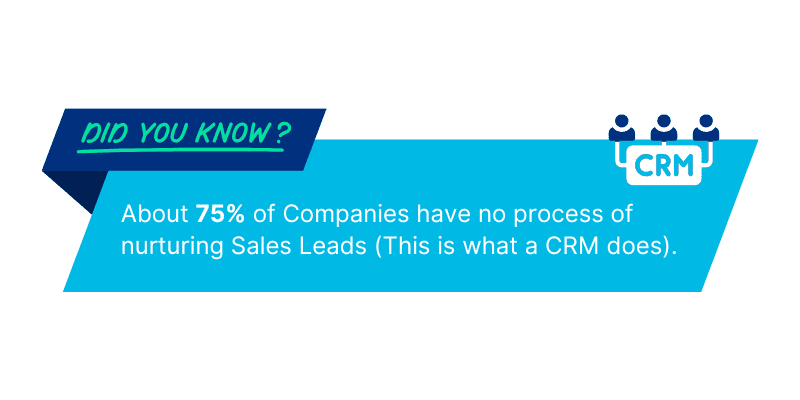
Implementing a CRM system is one of the most effective ways small businesses can boost sales and grow their customer base. CRMs are designed to streamline sales processes, enhance lead management, and ultimately improve conversion rates. Here’s how the right CRM tools can transform your sales strategy:
1. Improved Lead Management
One of the key features of any CRM is its ability to manage leads more effectively. Instead of manually tracking leads through spreadsheets or emails, a CRM automates the process, keeping all customer interactions and data in one place. This allows sales teams to:
- Prioritize leads based on interaction history or demographic data
- Automatically track where leads are in the sales funnel
- Set reminders for follow-ups, ensuring no opportunity slips through the cracks
Example:
A small digital marketing agency implemented HubSpot CRM to streamline their lead management. With HubSpot’s lead scoring feature, they were able to automatically rank leads based on engagement. This allowed the sales team to focus on the most promising prospects, resulting in a 20% increase in conversions within the first three months.
2. Enhanced Sales Tracking and Pipeline Management
A CRM helps businesses track the entire sales process, from lead generation to closing the deal. By providing visibility into the sales pipeline, a CRM ensures that sales teams can:
- Monitor deal progress in real-time
- Identify potential bottlenecks in the sales process
- Forecast sales with accuracy, allowing for better planning
Example:
A small retail company used Zoho CRM to gain better visibility into their sales pipeline. By automating their sales tracking and using continuous blueprint workflows, they could easily follow each lead’s journey. This improved sales forecasting accuracy by 30%, helping them manage inventory and resources more efficiently.
3. Automation to Boost Efficiency
CRMs automate many of the repetitive tasks that would otherwise consume valuable time—such as sending follow-up emails, logging calls, and tracking interactions. By automating these processes, sales teams can focus on high-priority tasks like closing deals and nurturing customer relationships.
Example:
A software startup integrated Salesforce CRM to automate follow-up emails and task management. This saved the team countless hours each week and allowed them to focus on personalizing interactions with high-value leads. As a result, their response time improved, and they saw a 15% uptick in deal closures.
4. Increased Conversion Rates Through Personalization
Personalized communication is key to converting leads into customers. CRMs help businesses segment their audiences and tailor messaging based on behavior, preferences, and past interactions. This level of personalization creates a better customer experience, driving higher engagement and increasing the likelihood of a sale.
Example:
A small e-commerce business used Monday.com CRM to segment their customers based on purchase history and engagement patterns. They created personalized email campaigns targeting repeat customers and high-value prospects. This approach boosted their email open rates by 25% and increased sales conversions by 10% in just two months.
5. Data-Driven Sales Strategies
CRMs provide comprehensive reporting and analytics tools, allowing small businesses to track key sales metrics such as lead conversion rates, average deal size, and sales cycle length. By leveraging this data, businesses can fine-tune their sales strategies, identify successful tactics, and make informed decisions to drive growth.
Example:
A B2B service provider adopted ELEADS CRM to analyze their sales performance. The CRM’s real-time reporting tools helped them identify a trend where leads tended to drop off after the second interaction. By adjusting their follow-up strategy and introducing more personalized touchpoints, they were able to increase their conversion rate by 18%.
Enhancing Customer Relationships with CRM
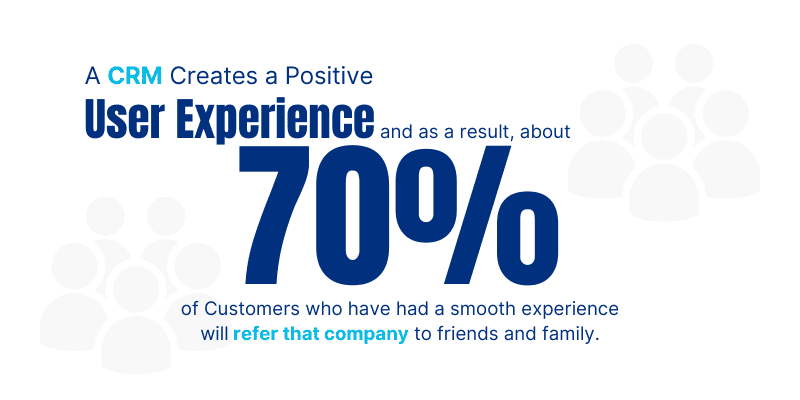
Building and maintaining strong customer relationships is critical for the success of any small business. A CRM system plays a key role in helping businesses achieve this by enabling them to personalize communication, improve customer satisfaction, and foster loyalty. Here’s how implementing a CRM can transform your customer relationships:
1. Personalizing Communication
Customers expect personalized, relevant communication from the businesses they engage with. CRMs make this possible by storing and analyzing customer data, such as purchase history, behavior, preferences, and previous interactions. With this information, businesses can:
- Segment customers into specific groups based on behavior and demographics
- Send tailored marketing messages, special offers, and product recommendations
- Personalize follow-ups to enhance engagement and trust
Example:
A small online retailer using Zoho CRM leverages the platform’s customer segmentation features to send personalized product recommendations to different customer segments. By doing this, they’ve not only increased customer engagement but also improved conversion rates by 20%, proving that personalized communication drives stronger customer relationships.
2. Improving Customer Satisfaction
A CRM helps businesses streamline and manage every aspect of customer interaction, ensuring that customers receive timely, relevant, and helpful responses to their inquiries. With a CRM for customer satisfaction, you can:
- Track all communication and interaction history, ensuring consistency in service
- Respond to customer inquiries more quickly and efficiently
- Set reminders for follow-ups, ensuring no customer issue is overlooked
Example:
A local service company adopted HubSpot CRM to streamline customer service inquiries. By using HubSpot’s automated task assignment and email tracking features, they ensured that customer questions were promptly addressed. As a result, customer satisfaction rates soared, with a 15% increase in positive reviews within just six months.
3. Boosting Customer Loyalty
Loyal customers are the backbone of any successful business. CRMs help improve customer loyalty by enabling businesses to build stronger, more meaningful relationships through personalized experiences and proactive communication. A CRM can:
- Track customer behavior to reward loyalty with targeted offers, discounts, or rewards
- Automate customer appreciation emails or exclusive deals for repeat customers
- Provide insights into customer preferences, making it easier to anticipate their needs
Example:
A small restaurant chain using Salesforce CRM introduced a loyalty rewards program for frequent customers, tailored based on each customer’s order history. By tracking purchase frequency and automating special offers for loyal customers, the restaurant saw a 25% increase in repeat business and significantly improved customer retention.
4. Enhancing Customer Retention
One of the most valuable aspects of a CRM is its ability to improve customer retention by anticipating customer needs and addressing pain points before they become major issues. By maintaining detailed records of each customer’s interactions, businesses can proactively engage with customers who may be at risk of leaving.
Example:
A financial advisory firm utilized ELEADS CRM to track client interaction and identify clients who had not engaged with their advisor in more than six months. With automated reminders to re-engage these clients, the firm reduced client churn by 18%, proving that timely follow-up and attention to customer concerns can significantly improve retention.
5. Building Long-Term Relationships
A CRM not only helps businesses win new customers but also ensures that existing customers stay engaged and happy. By utilizing CRM data, businesses can offer value throughout the customer lifecycle—whether it’s through nurturing post-sale relationships or resolving issues faster.
Example:
A marketing agency implemented Monday.com CRM to track post-sale customer interactions, ensuring that each client was consistently updated on their project status. This transparency helped build trust, resulting in stronger long-term relationships and a significant boost in client referrals.
Choosing the Right CRM for Your Small Business 3
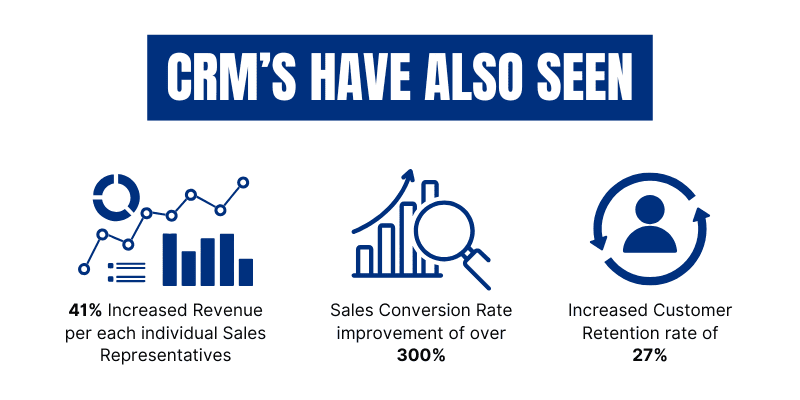
Selecting the best CRM for your small business can be challenging, given the variety of options and features available. However, with the right approach, you can find a CRM that aligns with your company’s size, budget, and specific needs. Here’s a checklist to help you make an informed decision when choosing a CRM:
1. Assess Your Business Needs
Before you begin comparing CRMs, take the time to understand your business requirements. Some important questions to ask include:
- What are the key tasks you need a CRM to perform (e.g., lead tracking, customer segmentation, sales automation)?
- How large is your customer base, and how quickly is it growing?
- Do you need a CRM for managing sales, marketing, customer service, or all three?
Tip: If your primary goal is managing leads and sales pipelines, you’ll need a CRM with robust sales tracking features. If marketing automation is more important, consider a CRM with advanced segmentation and email marketing tools.
2. Consider Your Budget
CRMs come in a range of price points, from free versions to premium, enterprise-level solutions. Be clear about your budget constraints and look for CRMs that offer the features you need within your financial limits.
- Free and Budget-Friendly CRMs: Tools like HubSpot CRM and Zoho CRM offer free plans that include essential features like contact management and lead tracking. These are great for small businesses with limited budgets.
- Mid-Tier Options: CRMs like Monday.com and Salesforce Essentials offer more advanced features and scalability at a reasonable cost for growing businesses.
- Enterprise-Level CRMs: If you have a larger budget and need advanced features like custom workflows, AI-driven analytics, or integration with multiple platforms, consider Salesforce or Dynamics CRM.
Tip: Many CRMs offer scalable pricing plans, allowing you to start with a basic package and upgrade as your business grows.
3. Prioritize Ease of Use
Your CRM should be user-friendly, especially if you’re a small business with limited IT resources. A complicated CRM can lead to low adoption rates among your team. Look for a CRM with:
- A clean, intuitive interface
- Easy navigation and minimal learning curve
- Mobile app support for on-the-go access
Example:
A small real estate company opted for Monday.com CRM because of its easy-to-use interface and mobile-friendly design, allowing agents to update leads and track deals from their smartphones while in the field.
4. Look for Key Features
The best CRM for your small business should have the following essential features:
- Sales and Pipeline Management: Track leads, manage deals, and monitor the sales pipeline in real time.
- Automation: Automate repetitive tasks like follow-up emails and appointment scheduling to save time.
- Customer Segmentation: Group customers based on demographics or behavior for more targeted marketing.
- Reporting and Analytics: Generate reports on key performance indicators like sales performance, customer engagement, and lead conversion rates.
- Integrations: Make sure the CRM integrates with your existing tools, such as email platforms, accounting software, and marketing automation tools.
Tip: If customer service is a key focus, ensure that the CRM offers support ticket tracking, customer feedback features, and help desk integrations.
5. Evaluate Scalability
Your small business may be small now, but it’s important to choose a CRM that can scale as your business grows. Look for a CRM that:
- Allows you to add more users and data without extra complexity
- Offers tiered plans with additional features as your needs evolve
- Can integrate with third-party tools as your business processes become more complex
Example:
A tech startup chose Zoho CRM because of its flexible pricing plans and customizable features. As the company grew, they were able to upgrade to more advanced plans without having to switch CRM providers.
6. Review Customer Support and Training
No matter how user-friendly a CRM is, there will be times when you need support. Ensure that the CRM you choose offers:
- Responsive customer support (via phone, chat, or email)
- Access to tutorials, knowledge bases, and forums
- Training programs to help your team get the most out of the CRM
Tip: Some CRMs, like Salesforce, offer extensive support and onboarding services, including one-on-one training, which can be especially helpful for businesses without a dedicated IT team.
7. Test Before You Commit
Most CRM providers offer free trials or demo versions. Take advantage of this to test the software’s functionality and ease of use before making a final decision. During the trial, focus on how well the CRM meets your core business needs and whether your team finds it intuitive to use.
Tip: During the trial, involve team members who will use the CRM regularly. Gather their feedback on the interface, ease of navigation, and overall experience to ensure that the CRM will be a good fit for everyone.
CRM Training Services by Munzai Solutions
In addition to choosing the right CRM for your small business, it’s essential to ensure your team is fully trained to use it effectively. Often, we work with clients who don’t use a CRM software or, if they do, have limited understanding of the capabilities. For cases like these, we have a developed a CRM training service to help our clients adopt CRM systems to the best of their ability and also train the relevant employees.
What Our CRM Training Covers:
- CRM Setup and Customization: Learn how to configure your CRM to suit your business needs.
- Sales and Lead Management: Understand how to track leads, manage pipelines, and automate sales processes.
- Customer Relationship Building: Use your CRM to personalize communication and improve customer satisfaction.
- Reporting and Analytics: Learn how to generate reports that provide valuable insights into sales performance and customer engagement.
- Ongoing Support and Updates: Get continuous support to keep your team up-to-date with CRM best practices and new features.
Get in touch with us today to learn more about our CRM training services and how we can help your small business succeed.
Frequently Asked Questions (FAQ)
Q1: What is the best CRM for small businesses in 2024?
There are several excellent CRM options for small businesses in 2024, including HubSpot
CRM, Zoho CRM, Salesforce CRM, ELEADS CRM, and Monday.com CRM. The best CRM for your business depends on your specific needs, such as budget, desired features, and scalability. For example, HubSpot is great for its free tier and user-friendly interface, while Zoho CRM offers advanced customization options at affordable pricing.
Q2: How does CRM software improve sales?
CRM software helps improve sales by:
- Streamlining lead management and follow-up processes
- Tracking customer interactions and sales pipelines more effectively
- Automating repetitive tasks such as email follow-ups, reminders, and reports
- Providing insights through sales analytics and performance tracking By offering real-time data and better organization, CRMs allow sales teams to focus more on closing deals and increasing sales efficiency.
Q3: What features should I look for in a CRM for my small business?
When selecting a CRM for your small business, look for the following key features:
- Sales and Pipeline Management: Keep track of leads and monitor your sales process.
- Automation: Automate emails, tasks, and follow-ups to save time.
- Customer Segmentation: Group customers for targeted marketing and personalized communications.
- Mobile-Friendly Interface: Access your CRM on-the-go.
- Integrations: Ensure the CRM integrates with your existing tools, like email, accounting, or marketing platforms. Popular tools like Zoho CRM and Salesforce CRM offer a range of these features to help small businesses scale.
Q4: What is the difference between HubSpot CRM and Zoho CRM?
HubSpot CRM is known for its easy-to-use interface, free plan, and marketing tools, making it ideal for small businesses with limited budgets. Zoho CRM, on the other hand, is highly customizable and scalable, with a wide range of pricing options and features tailored for growing businesses that need more flexibility.
Q5: Can I use a CRM to manage customer relationships and improve loyalty?
Yes, a CRM is an excellent tool for improving customer relationships and loyalty. CRMs like Salesforce and ELEADS help businesses personalize communications, track customer interactions, and offer insights into customer preferences. This enables businesses to offer more tailored experiences, address customer needs quickly, and reward loyalty with special offers or programs.
Q6: How do I know which CRM is the best fit for my small business?
Choosing the best CRM depends on factors such as your business size, specific needs, and budget. Start by identifying your most important requirements, such as sales tracking, automation, or customer segmentation, and compare the CRMs that offer these features. Many CRM providers, such as HubSpot, Monday.com, and Zoho, offer free trials or demos, so you can test the platform before committing.